There is a persistent myth in software development: that projects fail because developers write bad code. Some do, of course. But the vast majority of failed projects are not undone by syntax errors or poor algorithm choices. They are undone by something far more fundamental: nobody truly understood what needed to be built.
Requirements documents run to hundreds of pages that nobody reads. User stories are vague enough to be interpreted three different ways by three different developers. Acceptance criteria are written after the fact, as an afterthought. The result is software that technically works but does not actually solve the business problem it was created for.
Event Modeling offers a radically different approach. It provides a visual, comprehensive blueprint for your entire system that both business stakeholders and developers can understand, discuss, and agree upon before a single line of code is written.
What is Event Modeling?
Event Modeling, created by Adam Dymitruk, is a method for designing information systems by focusing on what happens in a system over time. Instead of starting with database tables or class diagrams, you start with events: the things that happen in your business domain.
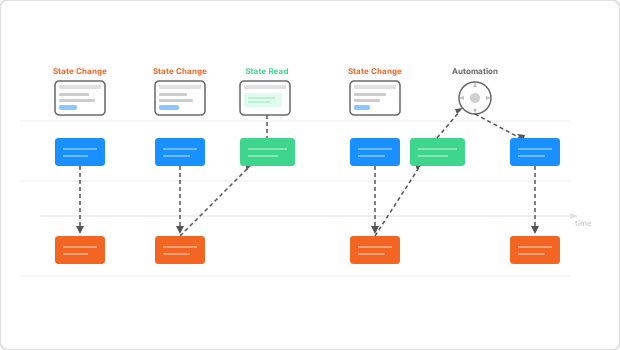
Picture a long horizontal timeline. On that timeline, you place sticky notes representing every significant thing that happens in your system. A customer places an order. A payment is processed. An invoice is generated. A shipment is dispatched. These are events, and they tell the story of your system in a language that everyone in the room understands.
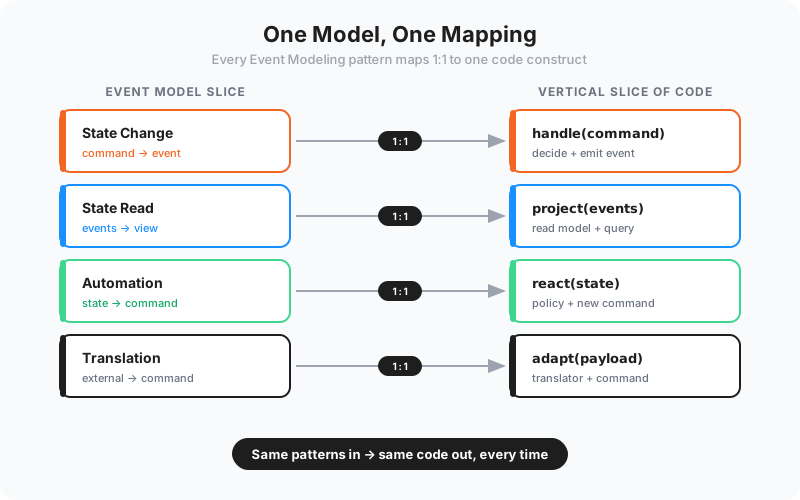
From this foundation, Event Modeling builds a complete specification of your system using just four patterns, four types of "slices" that together describe everything your software needs to do.
The Four Slice Types
The elegance of Event Modeling lies in its simplicity. Every feature in any information system can be described using just four patterns:
- State Change: A user performs an action that changes the state of the system. A customer submits an order, an administrator approves a refund, a manager updates a price. The slice captures the user's intent, the data they provide, the validation rules that must pass, and the resulting events that record what happened. This is where business decisions are enforced.
- State Read: A screen, report, or API response that displays information to a user. It reads from stored events and projects them into a view. Think of a dashboard showing order statistics, or a customer detail page. The state read defines exactly what information is shown, which events it is built from, and how it is structured.
- Automation: A slice that reacts to a particular state and produces further commands or side effects without human intervention. That state can be as simple as a single event having occurred, but it can also be more sophisticated — such as a certain amount of time having elapsed without a required activity taking place. For example, if an order has not been paid within 48 hours, an automation cancels it. Automations can also call external APIs, such as triggering a payment capture or sending a confirmation email.
- Translation: An integration point where the outside world pushes data into your system. A translation slice handles incoming information — an external system calling a webhook, a message arriving on your event bus, or a partner sending a file drop. It maps between the external system's language and your domain language, translating foreign data into commands or events your system understands.
That is it. Four patterns. Every feature you will ever build fits into one of these categories. This constraint is not a limitation; it is a liberation. It means your entire system can be described in a single, consistent visual language.
Shared Understanding: the Real Deliverable
The most valuable output of an Event Modeling session is not the diagram itself. It is the shared understanding that emerges from creating it.
When you gather business stakeholders, domain experts, and developers around a whiteboard (or a digital canvas) and walk through the system event by event, something powerful happens. Assumptions surface. Contradictions are exposed. Edge cases that would have become bugs six months from now are identified and resolved in minutes.
"The blueprint is a conversation made visible. Every sticky note represents a decision that was discussed, debated, and agreed upon by everyone who matters."
A product owner might say, "When a customer cancels an order, we refund them." A developer might ask, "What if the order has already shipped?" A domain expert might clarify, "In that case, we initiate a return process instead." This conversation, captured in the event model, prevents an entire category of bugs and misunderstandings.
Specifications in Business Language
One of Event Modeling's most important principles is that every slice is specified in business language. Not in technical jargon. Not in pseudo-code. In the language that the business uses every day.
A command is not "POST /api/orders with a JSON payload." It is "Customer places an order by selecting items and providing a delivery address." An event is not "OrderCreatedEvent with fields orderId, customerId, lineItems." It is "Order was placed for customer, containing specific items, to be delivered to a given address."
This matters enormously. When specifications are written in business language, business people can verify them. They can spot errors. They can say, "No, that is not how we handle international orders," before anyone has written a line of code. The cost of fixing a misunderstanding at the specification stage is nearly zero. The cost of fixing it after deployment can be catastrophic.
Why Event Modeling Outperforms User Stories
User stories have become ubiquitous in agile development, and for good reason: they shifted focus from technical specifications to user needs. But they have a critical weakness: they are isolated fragments that do not show how the system works as a whole.
"As a customer, I want to place an order so that I can receive my products." This tells you almost nothing about the mechanics of the system. What data does the customer provide? What happens after the order is placed? How does this relate to inventory, payments, shipping? User stories leave these connections implicit, expecting developers to fill in the gaps. And developers, lacking business context, often fill them in wrong.
Event Modeling, by contrast, shows the entire flow. You can trace a customer's journey from browsing to ordering to payment to delivery, seeing every command, event, read model, and automation along the way. Nothing is implicit. Nothing is left for developers to guess about.
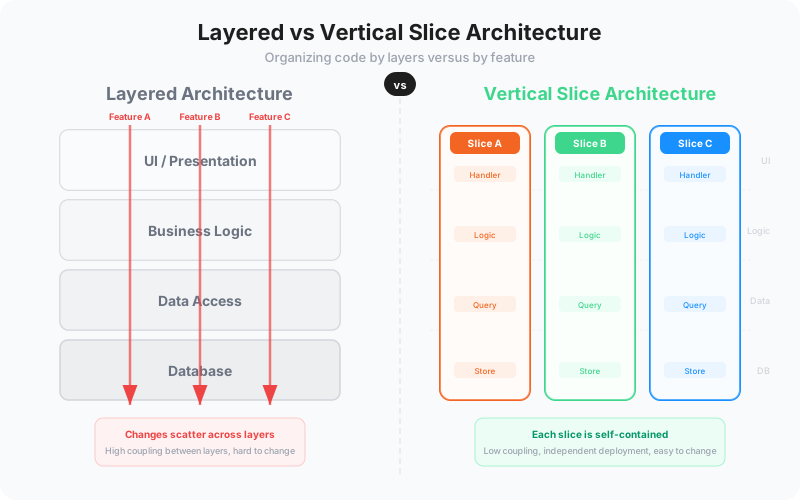
Moreover, because each slice is independently implementable, you get the same incremental delivery benefits that user stories promise, but with far greater precision about what each increment actually entails.
Enabling AI-Native Development
There is another reason Event Modeling is gaining urgency: it is the key to unlocking AI-native software development.
AI coding assistants are powerful, but they need precise specifications to produce quality output. Vague user stories produce vague code. But an event model slice, with its clearly defined inputs, outputs, business rules, and relationships, gives an AI everything it needs to generate production-quality implementations.
Each slice is a self-contained unit of work with clear boundaries. The command defines the input. The event defines the output. The business rules define the logic in between. An AI can take this specification and produce a complete, testable implementation, including validation logic, event publishing, and error handling.
This is not science fiction. At Sliceworkz, we use event models as the primary input for our AI-native development process. The precision of the specifications translates directly into the quality of the AI-generated code. The blueprint becomes the prompt.
Getting Started
You do not need special tools to start event modeling. A whiteboard and sticky notes work perfectly. Digital tools like Miro or specialized event modeling platforms can help for remote teams and long-term maintenance of the models.
The process begins with a brainstorming session where you identify the key events in your system. Then you arrange them on a timeline, add commands that trigger them, define the read models that users need, and identify the automations that connect events to subsequent actions.
The entire system emerges organically from these conversations. And because the notation is so simple, everyone in the room can contribute, regardless of their technical background.
If your projects suffer from miscommunication, scope creep, or features that do not quite match what the business needed, Event Modeling deserves your serious attention. It is not just a modeling technique. It is a fundamentally better way to build shared understanding about the software you need to create.